發表文章

目前顯示的是有「White Paper」標籤的文章

Social Media Login with 4ipnet
圖片
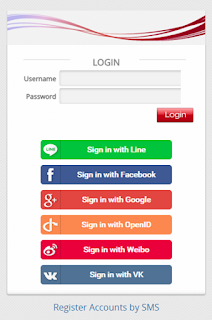
4ipnet supports free Wi-Fi access using “Social Login” including popular social Medias like “Facebook”, “Google+”, “LINE”, “Weibo”, “OpenID” and “VK”. Select your preferred social networking service and use the username and password for that service to sign on to the web site. This option negates the end user the requirement to remember his or her login information for other websites while providing site owners with uniform demographic information provided by the chosen social networking service. The use of Social Media Login allows the individual/group/business or venue to gain social media exposure and generate market awareness and revenue. Advantages of Social Login : Direct Content:   With social login, websites have the option to accept profile and social graph data in order to customize and target personalized content to the user. This may include information such as name, email and etc. Identities Differentiation:   Any user can log in to any website with mult...

4ipnet Wireless Access Point Optimization Part 8 of 8

圖片
Today we're putting an end to the wireless access point optimization series by introducing DHCP snooping and layer 2 firewall. Thanks for following through! DHCP Snooping In order for a device to begin using network services after connecting to an access point, it must first obtain an IP address from the network’s DHCP server. This is a point of vulnerability, as attackers can install their own DHCP server and assign clients arbitrary IP addresses and default gateways. In the worst case, a rogue DHCP server controlled by a hacker could potentially cause network administrators to lose control of their entire network, which is a major security flaw. The DHCP SNOOPING feature on 4ipnet APs prevents this type of network failure by allowing network administrators to specify the IP and MAC addresses of trusted DHCP servers. As a result, the APs will filter out DHCP messages from unrecognized servers, preventing them from ever reaching client devices. Although DHCP attacks are typ...

4ipnet Wireless Access Point Optimization Part 7

圖片
Good day! Today let us continue the wireless AP optimization series with "station isolation". In many Wi-Fi environments, it is not uncommon to see upwards of twenty or thirty devices connected to a single access point. Allowing direct communication between these clients would be a security concern for network operators, as malicious traffic from one client could potentially affect another. The STATION (CLIENT) ISOLATION feature on 4ipnet APs allows network operators to prevent devices connected to the same AP from communicating with one another, essentially creating a virtual network per client. Station Isolation prevents direct communication between clients on the same AP Imagine that you have a bunch of strangers connected to the same access point in a coffee shop, all of whom are assigned IP addresses by the same DHCP server, which usually means that they are on the same network (subnet). If a user were to have file sharing turned on (e.g. Windows-based system), t...

4ipnet Wireless Access Point Optimization Part 6

圖片
Happy Chinese New Year! (It's the year of the horse by the way.) Today let's talk about proxy ARP and WPA2. PROXY ARP ARP (Address Resolution Protocol) is an essential protocol in networking (both wired and wireless) that resolves IP addresses to MAC addresses when data needs to be sent between two hosts. Whenever a host wishes to obtain the physical address (MAC) of another, it will broadcast an ARP request onto the network. On wireless networks this may sometimes be additional and unnecessary traffic that decreases overall network performance. 4ipnet access points address this issue by employing PROXY ARP to reduce the amount of ARP packets in the wireless medium, handling ARP requests itself instead of forwarding them onto the wireless medium when possible. As long as the AP’s own ARP table has a record of the address requested, it can respond on behalf of the actual host. As a result, the amount of ARP packets in the air diminishes and hosts learn MAC addresses mu...

4ipnet Wireless Access Point Optimization Part 5

Good day! We've received some positive feedback from you, our readers, and we're happy that you found the articles useful. Today we'll continue introducing you how Wi-Fi performance can be enhanced by 4ipnet APs. WMM (WI-FI MULTIMEDIA) If you’ve ever observed VoIP over Wi-Fi working flawlessly even when there were tons of other applications simultaneously using the network, then you’ve seen WMM (WI-FI MULTIMEDIA) in action. WMM provides fundamental QoS (Quality of Service) functionality to wireless networks by increasing the performance of differentiated wireless traffic, such as audio, video, and traditional application data. Based on the needs of each type of data, they are placed in one of four different queues, BE (Best Effort), BK (Background), VI (Video), and VO (Voice). Recall the earlier description of Wi-Fi medium access using CSMA/CA – clients must wait for a random amount of time before retrying transmission if a busy medium is detected. WMM assigns shorter ...

4ipnet Wireless Access Point Optimization Part 4

圖片
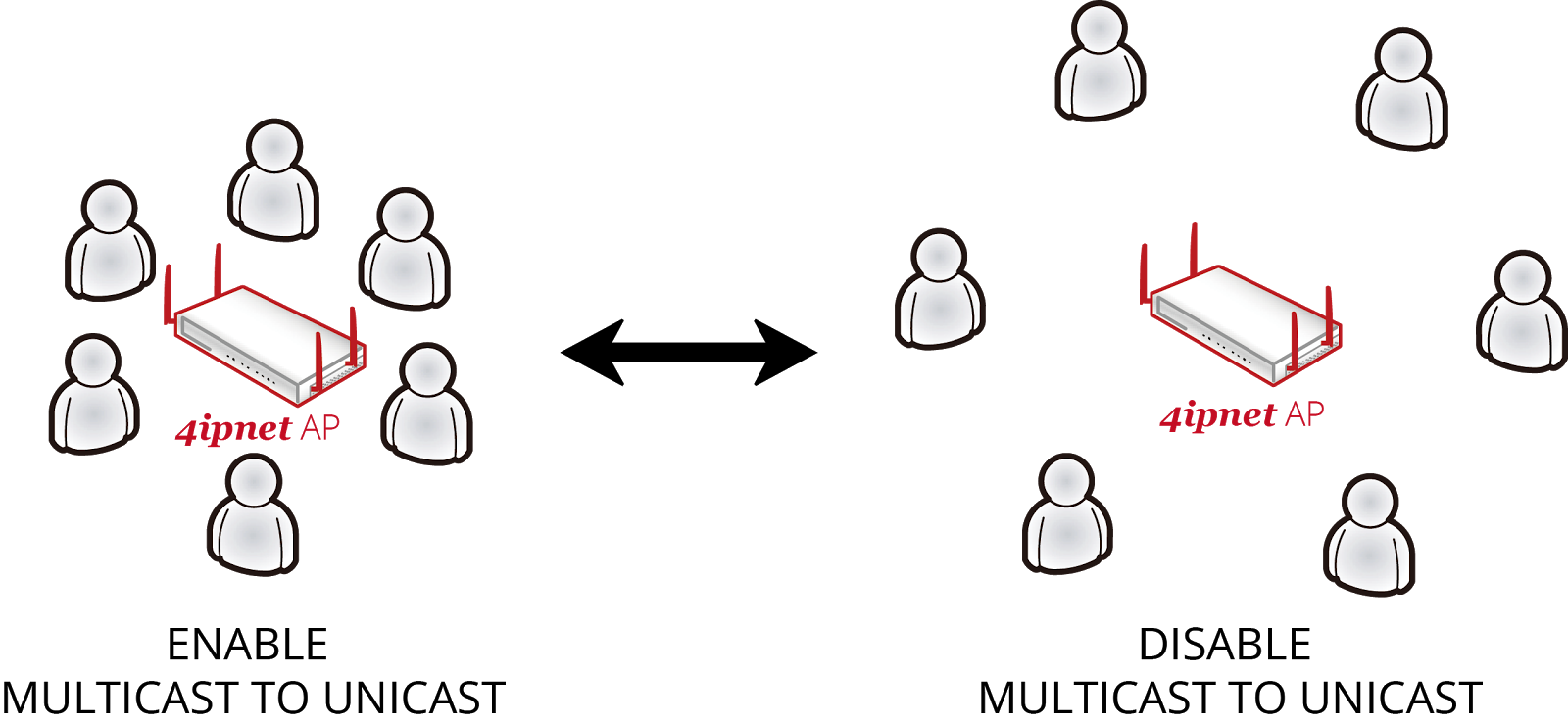
Hello everyone! We'll continuing introducing how 4ipnet APs can enhance Wi-Fi performance. Today's topic is Multicast to Unicast Conversion. In Wi-Fi networks, multicast packets are typically sent at slower rates to ensure that devices at the edge of an AP’s cell are able to receive the packets without error. This may be useful in environments where most clients are a certain distance (further away) from the AP. However, if the cell size is very small and most clients are densely packed around the AP, this would be an inefficient use of airtime. Why send at 11M when you can send at 300M? MULTICAST TO UNICAST CONVERSION is a method that 4ipnet APs employ to convert multicast transmissions to unicast so that they can be sent at unicast rates. When clients are close to an AP, high transmission rates can be more easily sustained, and thus unicast is more efficient. On the other hand, attempting to use the same rate with clients far away from the AP will lead to a high number of...

4ipnet Wireless Access Point Optimization Part 3

圖片
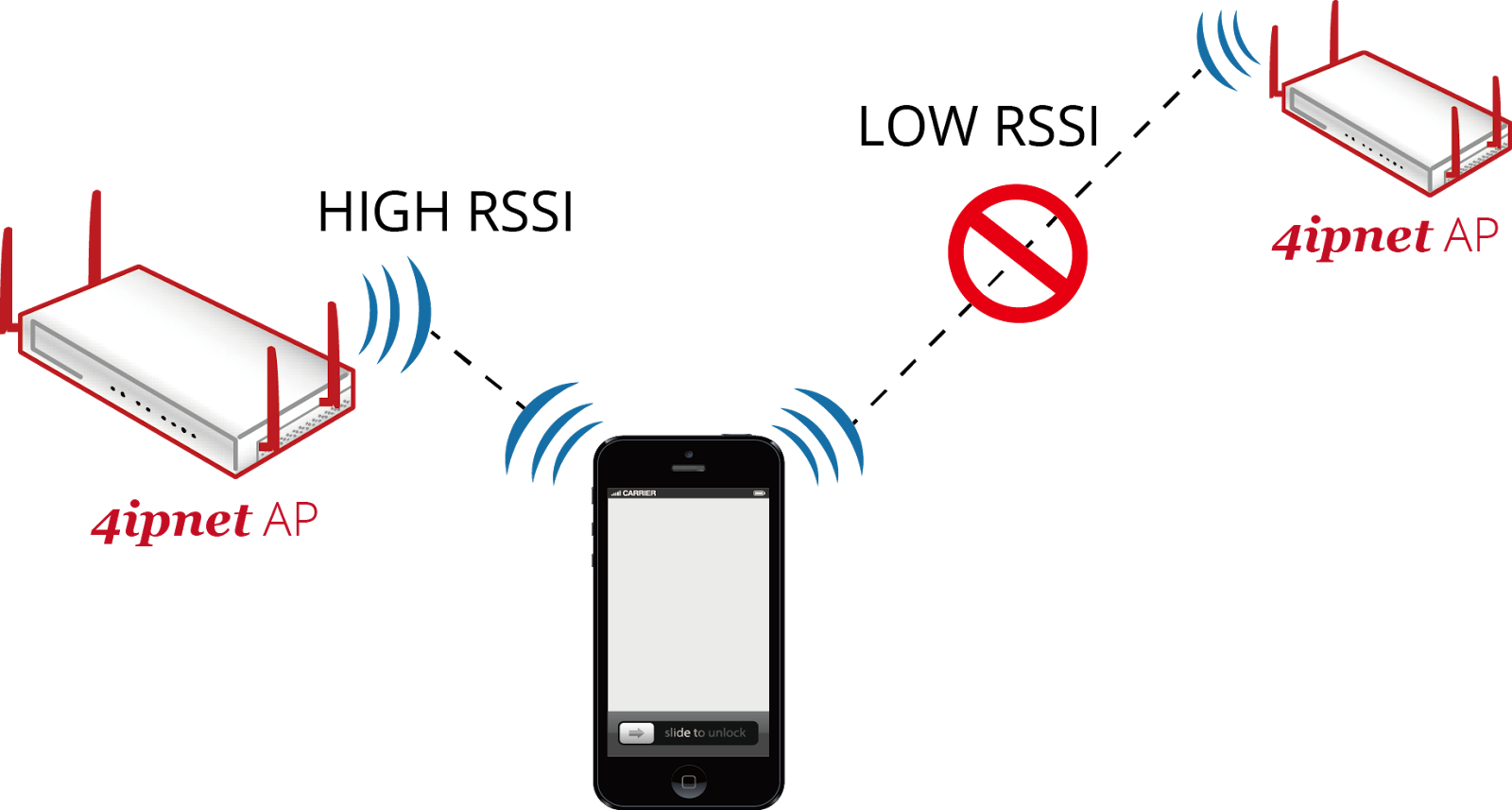
Hello people! After Airtime Fairness and band steering, this week we'll move on to optimal client filtering. Earlier in this feature guide we described Wi-Fi as a form of a wireless communication that utilizes CSMA/CA to avoid collisions during data transmission. As mentioned, one caveat of this protocol is that anyone who wishes to use the medium to transmit must wait until the medium is free (unused). Therefore, if a device or client takes a long time to transmit a small amount of data, overall network throughput is decreased. Now let us consider the case where a network consists of only 802.11n (or 802.11ac) clients. Theoretically, everyone can get in and out of the medium in a short amount of time, since under 802.11n/ac standards data can be transmitted at relatively fast rates. In this case, is network performance optimized? Legacy clients are not the only issue in a wireless environment – even though all clients may utilize the most up-to-date standard, some clients wil...

4ipnet Wireless Access Point Optimization Part 2

圖片
Happy New Year to everyone! Hope you all enjoyed the holidays! Now let us continue the series, giving you more concrete ideas about the features on 4ipnet APs. Last time we've covered Airtime Fairness; today we' ll talk about band steering. Band Steering In today’s wireless environment the unlicensed 2.4 GHz frequency band is becoming increasingly congested due to the explosion of mobile devices. As a result, many consumer device manufacturers, whether it be of laptop computers or smartphones, have incorporated 5 GHz-capable Wi-Fi chipsets in their devices. Furthermore, 802.11ac ready consumer devices are already making their way into the hands of everyday users. This begs the question: When a Wi-Fi environment offers connectivity in both 2.4 GHz and 5 GHz, and clients have both 2.4 GHz and 5 GHz capability, how do network operators balance the load Figure: Clients capable of 5 GHz are "steered" towards 5 GHz networks between the two frequency bands? One method i...

4ipnet Wireless Access Point Optimization Part 1

圖片
Hello, there! Starting from this week, we will introduce you how 4ipnet's access points enhance the overall performance of managed Wi-Fi. We will focus on the performance and security features of 4ipnet access points, and in the process clearly illustrate the differences between 4ipnet APs and regular consumer-grade APs. Airtime Fairness As networks migrate between wireless standards – previously from 11g to 11n, and now from 11n to 11ac – network operators are increasingly struggling with the tradeoffs between legacy client support and wireless performance. For example, when both 11g and 11n clients are connected to the same AP, an 11g client will take much longer (use more airtime) to complete the transfer of the same amount of data as an 11n client. To understand why this matters, we must first briefly explain how data is transmitted over Wi-Fi. The fundamental concept behind wireless transmission is that two devices cannot transmit at exactly the same time in the same f...

4ipnet Micros Opera Feature Guide

In addition to access control, the integration with Micros Opera PMS is another major feature of 4ipnet WHG-series WLAN Controllers. This feature guide will give you a detailed look on how it works. Sales Inquiries: Sales@4ipnet.com Support: support@4ipnet.com Marketing: marketing@4ipnet.com 

4ipnet Access Control Feature Guide

Access control is a major feature of 4ipnet WHG-series WLAN Controllers. This feature guide will give you a detailed look on how it works. Sales Inquiries: Sales@4ipnet.com Support: support@4ipnet.com Marketing: marketing@4ipnet.com 

4ipnet WDS Links

圖片
The WDS management function helps administrators plan and setup a "Tree" structure of WDS network with managed APs. WDS Connection Settings: Determine the Channel and Security Type for the APs deployed in the WDS network tree. WDS Status: Shows the added APs in the WDS Tree with Security and Channel settings. More than one WDS Tree can be set up in your network. Click "Edit" to change the WDS connection settings for the associated WDS Tree. This list can be set to refresh automatically at fixed intervals (10s, 20s, 30s, 40s, 50s, 60s). WDS Update: To add a new WDS connection, select New Parent AP and New Child AP from the respective drop-down list and click "Add". Note that a new WDS Tree will be added if the selected Parent AP is not in any of the current WDS Trees. To update the current WDS tree, select Update Parent AP and Update Child AP from the respective drop-down list and click "Move". Note that the link to the original par...

Spectrum Analysis: a powerful tool for modern Wi-Fi

圖片
Extracted from "B2Bchannelblog.com" http://b2bchannelblog.com/2013/03/10/spectrum-analysis-a-powerful-tool-for-modern-wifi-infrastructure/ The increasing congestion of the 2.4 frequency together with the challenges originated by the BYOD requires that the ICT channel must use effective and possibly economical powerful tools for the analysis and troubleshooting of modern infrastructure Wifi. Fortunately, vendors like 4ipnet incorporate these tools in their Access points (AP). In this post I would propose an example of how to use the Spectrum Analysis to identify interferences due to a microwave at the AP level. Back to basic. In its essential configuration, a Wifi infrastructure is composed by an Access Point and a client. This is like a marriage: in order to avoid problems is essential that the two can talk and listen to each other (Fig 1). In an ideal word, the capacity of the two ‘spouses’ to communicate is determined by the combination of the transmit power (TX) , the ...

4ipnet's Multi-level Administrative Accounts Feature

圖片
Introducing 4ipnet's Multi-level administrative accounts feature, suitable for Enterprise Wireless LAN Solutions. More flexible and user-friendlier than ever, administrators can now configure different privileged for other IT personnel within other service zones and customize their policy access according to the venue's security access limitations. For instance, hotel personnel can differentiate their wireless administrative privileges between an MIS and a staff member, an enterprise setting can alsodifferentiate administrative privileges from a MIS to an entry level intern.  

4ipnet Wireless Smart Device Server Setup Part 2.

圖片
Managing SDS200W on the Web Management Interface SDS200W is designed specifically to operate in conjunction with all 4ipnet Gateways/Controllers, including both HSG and WHG series. If you are not using default settings, before connecting SDS200W to your 4ipnet Gateway/Controller, some configurations steps are required. Go to the Web Management Interface (WMI) for SDS200W’s relevant configurations. The default values are: IP address: 192.168.1.10 Subnet Mask: 255.255.255.0 Default Gateway: 192.168.1.254 Remember to set the TCP/IP settings of the computer you use with a static IP address that is under the same subnet as SDS200W. For example: 192.168.1.20. The settings of SDS200W are separated into seven categories, which are 1. System – to setup the system name and device control. 2. Uplink – to determine wired / wireless relevant parameters. Any change on this page will take effect after rebooting the system. 3. Console – to change console related settings for POS...

4ipnet Wireless Smart Device Server Setup Part 1.

圖片
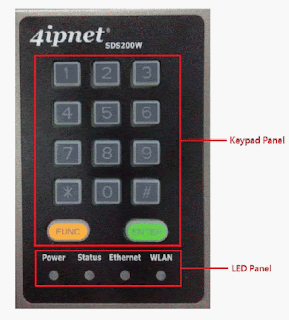
Terminal Configuration is a list of serial-to-Ethernet devices that communicate with the system only; never get online and no need to go through authentication. SDS200W is an innovative product 4ipnet offers to facilitate the communication between 4ipnet hotspot gateway and serial POS printer. It is mainly used to have the connected printer fast-print necessary account information extracted from a 4ipnet hotspot gateway for a user who would like to access the Internet or managed networks, making provisioning of wired or wireless connection easier and more user-friendly. What is noteworthy is that, SDS200W supports wireless connectivity to the uplink gateway. That is, operators now can deploy a network with lesser physical wires. Keypad Panel Overview Useful Shortcut Keys LED Indicators Understanding the LED indicators There are four LED indicators on the panel : Power, Status, LAN, and WLAN from left to right. Below sum...

4ipnet WISPr for ISP Roaming

圖片
On the 4ipnet Wireless LAN Controller, WISPr or Wireless Internet Service Provider roaming - Pronounced "whisper," is a draft protocol submitted to the Wi-Fi Alliance that allows users to roam between wireless internet service providers, in a fashion similar to that used to allow cell phone users to roam between carriers. A RADIUS server is used to authenticate the subscriber's credentials. If a RADIUS server has been configured, the WISPr attributes used duringRADIUS authentication can be defined here in this Service Zone. WISPr Smart Client: Select Enable if you wish to allow customers with a roaming account from a WISPr agent (iPass, WiFi Skype, Boingo, and etc.) to access your internet. Make sure to Enable the HTTPS Protected Login field under System >> General in order for roaming software on the client’s device to work properly.Smart Client Black List: Fill in the WISPr agent names and enable to block users from that particular WISPr...

4ipnet PMS Integration with Wireless LAN Controller

圖片
This section introduces the Port Location Mapping feature. This feature is designed for creating multiple VLAN divisions (as if they were separate LAN ports) under a Service Zone and mapping these VLANs to different locations individually. This feature can be utilized to provide separate VLAN to separate clients in MTU/MDU deployments where a VLAN switch is deployed under the gateway to provide VLAN connection to individual rooms. The Port Location Mapping feature is also commonly used in hospitality venues to manage the internet service for their guest rooms and public areas. In addition it can operate in conjunction with third party hospitality applications and has been tested with the Net Retriever middleware which provides seamless integration between the gateway and the popular High Speed Internet Access (HSIA) hardware and Front Office System (FOS) software. Each Port Location Mapping entry can be configured to provide charged (single or multiple user), free or ...

4ipnet Wireless LAN Controller Basic AP Management

圖片
Management of access points are always of vital importance for a network administrator. Thus 4ipnet delivers a simple, straightforward set of management tools to help you achieve it. Generally, we suggest a centralized network with a controller in charge of access points both on the WAN side and the LAN side. We call the WAN-side AP management ‘the wide area management,’ due to is scalability across the Internet or intranet, and the LAN-side AP management ‘the local area management.’ Below illustrates the concept of these two types of management.                4ipnet WHG models have different manageability with 4ipnet access points, i.e., admin should make sure what AP models your 4ipnet WHG controller supports. Manageable 4ipnet Access Points for Local AP Management may be checked at: Main Menu >> Access Points >> Local Area AP Management >> Overview. Manageable 4ipnet Access...

Concept of Service Zone on the 4ipnet Wireless LAN Controller

圖片
Service Zones are virtual partitions of the physical LAN side of a 4ipnet Controller. Similar to VLANs, they can be separately managed and defined, having their own user landing pages, network interface settings, DHCP servers, authentication options, policies and security settings, and so on. By associating a unique VLAN Tag (when it is tag-based) and an SSID with its Service Zone, administrator can flexibly separate the wired and wireless networks easily. Tag-based or Port-based Service Zones 4ipnet WHG controllers offer two modes of physical LAN port to service zone mappings, namely port-based mode and tag-based mode. Intuitively as the name suggests, Port-based mode means that each LAN port services one or none Service Zones, so the maximum number of service zones is equivalent to the number of LAN ports on a 4ipnet WHG controller. On the contrary, Tag-based service zones are not limited by the number of ports, for they are specified by the VLAN tag ID...